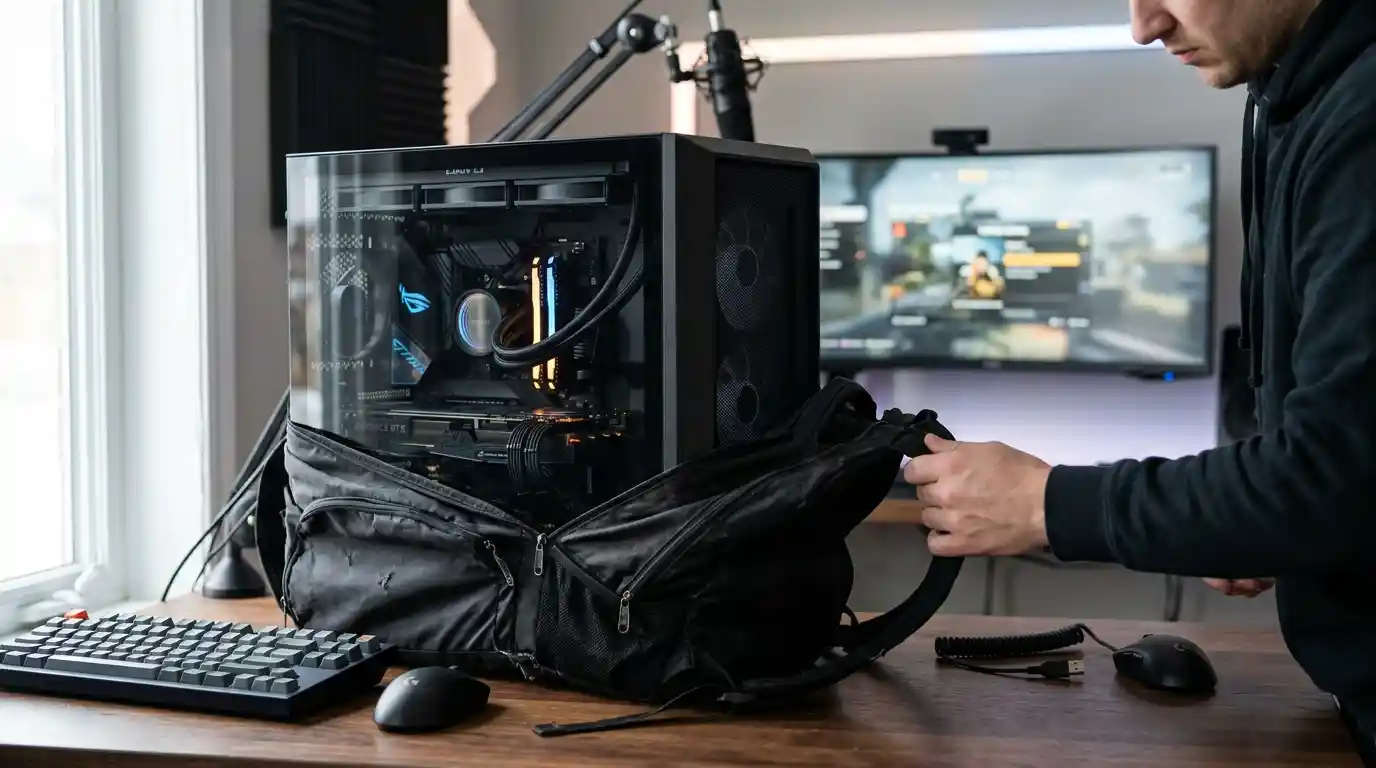
There are few things more frustrating than spending good money on a gaming PC, carefully choosing every component, and then realizing that the bag advertised as a protective carrying case offers about as much security as a grocery bag with shoulder straps. It looks impressive in product photos, promises convenient transportation, and claims to be designed for gaming equipment. Then you touch the material, inspect the stitching, and wonder whether it can handle anything heavier than a change of clothes.
The Gaming PC Is Expensive. Why Is the Bag So Cheaply Built?
A gaming desktop is not an ordinary everyday item. Depending on the build, it may contain a heavy graphics card, a large CPU cooler, multiple storage drives, delicate connectors, and a glass side panel that deserves more respect than a thin layer of fabric. Even a well-assembled computer can be damaged if it is handled carelessly during transportation.
Yet some carrying cases appear to treat protection as an optional extra. They use thin walls, weak seams, minimal cushioning, and flexible panels that collapse under their own weight. The product may be marketed as a gaming PC backpack, but the construction resembles a generic storage bag with a few gaming-related words added to the description.
That is the difference between a bag that can physically hold a computer and one designed to transport it responsibly. Capacity alone does not make a case protective.
Thin Padding Is Not Real Protection
Padding is one of the first things worth examining when choosing a computer carrying case. A soft interior can help prevent scratches, but a thin lining does not automatically protect a desktop tower from hard impacts. The padding must be appropriately placed, securely fitted, and supported by a design that keeps the computer from shifting around.
Think about what happens when a bag bumps against a doorframe or gets placed roughly on a hard floor. If the computer sits directly against the outer wall, the impact can travel through the bag and reach the hardware. A few millimeters of soft material may make the product feel comfortable without providing meaningful protection against every type of impact.
For a desktop system, look for substantial cushioning, reinforced corners, a supportive base, and internal restraints that prevent unnecessary movement. If your setup includes a large graphics card or heavy cooler, consider whether those components should be removed or separately secured before transport.
Weak Stitching and Straps Are a Disaster Waiting to Happen
A carrying case can look sturdy until it is loaded with a real computer. Empty bags are deceptively easy to handle. The true test begins when the weight of a tower pulls on the shoulder straps, handles, seams, and attachment points.
Thin shoulder straps can dig into your shoulders, while poorly reinforced attachment points may stretch or tear under repeated stress. Weak stitching around a handle is especially concerning because that is precisely where the bag experiences concentrated force.
Before buying, inspect the stitching around every handle and strap connection. Look for reinforced seams, securely attached hardware, adjustable straps, and handles that are comfortable enough for short-distance carrying. A chest strap can improve stability, but it cannot compensate for weak construction.
Remember that a heavy desktop is not necessarily comfortable or safe to carry on your back. Even a well-made backpack can become awkward when the load is bulky, unbalanced, or difficult to control.
A Gaming PC Carrying Case Should Not Collapse Under Pressure
Structure matters. A case that folds inward when empty may be inconvenient to load, but the bigger concern is what happens when the computer is inside. Flexible walls can allow the tower to shift, expose corners to pressure, or leave delicate areas vulnerable to objects packed alongside it.
A structured case with reinforced panels, a stable bottom, and suitable internal support is generally a better starting point than a floppy bag with oversized pockets. However, rigidity by itself is not enough. A hard outer shell without adequate internal cushioning can still transfer impact directly to the computer.
The ideal design combines structural support with appropriate padding and a snug, secure fit. It should be easy to open, load, close, and carry without forcing the computer into a space that is too small.
Water-Resistant Fabric Does Not Mean Waterproof Protection
Marketing descriptions frequently emphasize water-resistant fabric as if it solves every transportation problem. It does not. A water-resistant exterior may help protect equipment from light splashes or brief exposure to drizzle, but that is not the same as a waterproof enclosure with sealed seams and protected openings.
Water can enter through zippers, seams, uncovered openings, and worn areas. A bag may repel droplets on its outer surface while still allowing moisture to reach the computer during prolonged exposure to rain.
If you regularly travel with your gaming equipment, look for a design with a suitable weather-resistant exterior and protected closures. During wet weather, use additional protection and avoid placing the case on wet ground. Never assume that a water-resistant label makes expensive electronics safe in heavy rain.
Too Many Pockets, Not Enough Useful Space
Gaming equipment comes with plenty of accessories. You might need a keyboard, mouse, headset, controller, power cables, and other peripherals. Separate compartments can help keep these items organized, but extra pockets are not automatically a sign of good design.
A case becomes frustrating when its pockets are too shallow, its compartments are poorly positioned, or its internal dividers reduce the space available for the actual computer. Worse, accessories can press against the tower if they share the same compartment without adequate separation.
Choose a layout that fits your equipment rather than buying a bag simply because it advertises a large number of compartments. Dedicated storage for accessories is useful when it prevents them from scratching the case, pressing against glass panels, or tangling around cables.
Measure Your PC Before Trusting the Product Description
One of the easiest mistakes is assuming that a carrying case advertised for a gaming PC will accommodate every desktop tower. Computer cases come in different shapes and sizes, and a bag that fits a compact build may be completely unsuitable for a large mid-tower or full-tower system.
Measure the computer’s height, width, and depth, including any protruding handles or other features that affect its dimensions. Compare those measurements with the carrying case’s usable internal dimensions rather than its exterior measurements.
Leave enough room for the intended protective padding without making the fit so loose that the tower slides around. Also consider the weight limit, opening dimensions, and whether the bag can support the computer in its intended carrying position.
When transporting a compact system or gaming laptop, a purpose-built option may be more practical than a large desktop tower case. The distinction is important: a laptop backpack is not automatically suitable for a desktop PC, regardless of how aggressively it is marketed toward gamers.
Protect the Hardware Inside, Not Just the Outside
Even a quality carrying case has limitations. The exterior cannot eliminate every vibration, sudden movement, or impact. Internal component security matters just as much as the bag’s construction.
Before moving a desktop, shut it down completely, disconnect cables, and secure loose accessories separately. Check whether the graphics card, CPU cooler, or other heavy components require special handling. For a system with a particularly heavy graphics card, removing it and transporting it separately in suitable protective packaging may reduce stress on the motherboard and expansion slot.
Glass panels deserve additional care. Prevent them from rubbing against hard objects, and avoid placing pressure on the panel while loading the computer. If the case manufacturer provides transportation guidance, follow it rather than assuming that ordinary handling practices are sufficient.
Cheap Now Can Mean Expensive Later
Budget matters, and not everyone needs a premium transport case. However, the cheapest option is not always the most economical choice when it fails to protect the equipment it is supposed to carry.
Compare the quality of the materials, reinforcement, internal padding, closure system, weight capacity, and usable dimensions. Read customer feedback carefully, paying particular attention to reports about broken straps, damaged zippers, insufficient cushioning, and poor fit. Product photographs alone cannot establish how a bag performs under load.
For occasional short-distance moves, a reasonably constructed padded case may be sufficient when handled carefully. Frequent transport, travel between gaming events, or carrying a heavy and expensive tower calls for a more protective solution. Your choice should reflect the value of the equipment and the conditions in which you will move it.
What a Proper Gaming PC Carrying Case Should Offer
A dependable case should combine several practical features rather than relying on flashy marketing. Look for reinforced handles and attachment points, durable fabric or a suitable structured shell, a supportive base, well-positioned padding, reliable zippers, and enough internal space for your exact computer.
It should also keep accessories separate from vulnerable components, remain reasonably comfortable to carry, and provide a realistic level of weather protection. Clear product dimensions and a stated load capacity are more useful than vague claims about being heavy-duty or gaming-ready.
If you are comparing gaming equipment and accessories, our guide to the gaming experience and gaming-related technology offers another starting point for exploring the broader gaming landscape. The important principle remains the same: match the product to the actual job it needs to perform.
Final Verdict: Stop Calling Every Backpack a PC Case
A flimsy backpack does not become a protective computer case because it has a large compartment, a few padded sections, or a gaming-themed product description. A desktop PC is heavy, expensive, and filled with components that deserve careful handling.
Before buying, inspect the construction, measure your equipment, check the load capacity, and consider how often you will transport the system. Do not confuse water resistance with waterproofing, soft lining with impact protection, or a large storage space with a secure fit.
The right carrying case does not need unnecessary gimmicks. It needs to fit the computer, support its weight, protect vulnerable areas, and remain reliable when used as intended. Until more bags meet those basic expectations, this hate letter to flimsy gaming PC backpacks remains well deserved.